
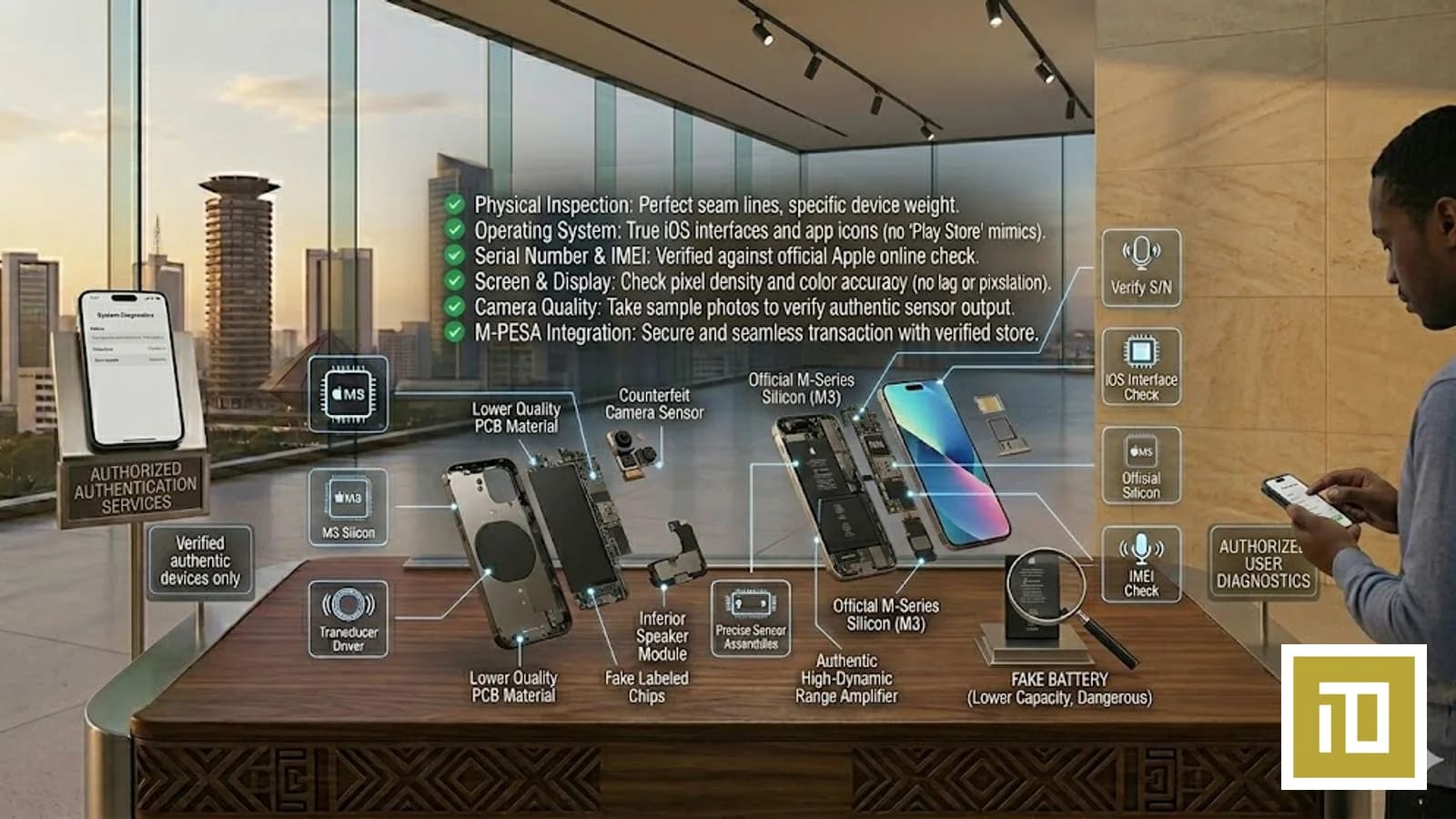
How to Spot a Fake iPhone in Kenya 2026 — The Complete Buyer's Detection Guide
The Kenyan iPhone market is flooded with counterfeits in 2026 — and the fakes have gotten dramatically better. Modern Chinese clones (sometimes called "Goophone" or "Master Copy") replicate the iPhone box, the weight, the icons, and even fake an iOS-style Settings menu running on a custom Android skin. The suspiciously cheap "iPhone 17 Pro Max" listings on Jiji at a fraction of retail are usually one of these. This is the up-to-date 2026 detection guide.
The 12-Point iPhone Authenticity Check (Run All Before You Pay)
1. Dial *#06# — the IMEI test
On any real iPhone, dialing *#06# in the Phone app instantly shows the IMEI and serial number in a system overlay. On clones, you get either nothing, an error, or a faked overlay. Verify: dial it, screenshot the result, then go to Apple's checker (Step 2). Real iPhones expose this automatically; fake iPhones either skip the step or show invented numbers.
2. Verify the serial at checkcoverage.apple.com
Apple's official site checkcoverage.apple.com accepts any genuine iPhone serial and returns: device model, purchase date, warranty status. Fake iPhone serials return "not recognised" or "serial not found". This is the single most reliable check — Apple itself confirms or denies the device.
3. Test the App Store — does the real App Store actually load?
On fake iPhones, the "App Store" icon often launches a re-skinned Google Play Store or a static fake catalogue. Try searching for a specific real app (e.g. "WhatsApp Business") and download it. A real iPhone downloads from Apple's CDN and installs the real binary. A fake iPhone either fails, downloads a clone, or shows broken icons after install.
4. Try to enable iMessage and FaceTime
Settings → Messages → iMessage toggle ON. Real iPhones contact Apple's servers and activate iMessage within 2–5 minutes — your phone number registers. Fake iPhones either show a perpetual "Waiting for activation..." spinner forever, or display a fake "Activated" without ever actually working. Test by texting a real iPhone owner — if the bubble is green instead of blue, iMessage didn't activate, and your device is fake.
5. Try Face ID enrolment (Pro and Air models)
Settings → Face ID & Passcode → Set Up Face ID. Real iPhones use the TrueDepth camera array (dot projector + IR camera + flood illuminator) to capture a 3D depth map of your face. Fake iPhones use the regular front camera and 2D face recognition — easily fooled by a printed photo. Try the photo test: print a colour photo of your face, hold it 30cm away, see if "your iPhone" unlocks. A real iPhone refuses; a fake unlocks.
6. Hold an actual real iPhone next to it — weight, finish, screen
Walk into iTey Store at Cookie House, Accra Road, ask to hold a real demo unit of the model you're considering, then bring the suspect unit alongside. Side-by-side: (a) the weight will feel different (real iPhones are denser due to titanium / aluminium frame), (b) the finish will look different under bright light (clones use lower-grade anodisation), (c) the screen — at the same brightness, real OLED is noticeably brighter and richer than a clone's IPS LCD.
7. Check the screen refresh rate (Pro models — ProMotion 120Hz)
Real iPhone Pro models (13 Pro onwards) have ProMotion 120Hz adaptive refresh — text scrolls smoother than 60Hz. Easy test: open Safari, load a long page (e.g. Apple.com home), scroll fast. Real Pro iPhones look glassy-smooth; fakes look choppy. If you're being sold an "iPhone 17 Pro Max" and the scroll is choppy, it's a fake.
8. Try the iPhone Mirroring feature with a Mac (or know its limitations)
iPhone Mirroring (iOS 18+ paired with macOS Sequoia+) lets you control your iPhone screen from a Mac. Even ChatGPT or Gemini cannot fake this — it requires Apple's secure enclave handshake. If the seller can demonstrate iPhone Mirroring working with their MacBook, the device is genuinely an iPhone. If they refuse or it fails, walk away.
9. Check the haptic feedback on the Action Button (15 Pro onwards) and Camera Control (16 onwards)
Real iPhones have the Taptic Engine — a custom haptic motor that gives crisp, precise vibrations. Press and hold the Action Button on a real iPhone 15 Pro or newer — you'll feel a sharp tick. Press it on a fake — you'll feel either nothing or a generic phone-grade vibration. Same for Camera Control on iPhone 16+.
10. Examine the lightning / USB-C port and Apple cable for "Made for iPhone" handshake
Real iPhones with USB-C (15 onwards) authenticate cables via the MFi chip. Plug in a non-MFi cable (any random USB-C cable from a generic shop) and the iPhone may display "Cable not supported" or limit charging to slow. Fake iPhones accept any USB-C cable without distinction because they have no MFi authentication.
11. Check the iOS version and look for impossible features
Settings → General → About → Software Version. Real iPhones in 2026 run iOS 26.x (released Sep 2025). Fake iPhones often run a re-skinned Android pretending to be iOS — visible at the edges if you trigger the navigation gesture (Android shows back/home/multitasking; iOS shows the iOS home-bar gesture). Also: try Apple Intelligence features (Genmoji, Image Playground, Writing Tools). Real iPhones 15 Pro and newer support these; fakes can't fake them because they require actual Apple silicon Neural Engine.
12. Drop into the Apple Store on Apple.com — does the device's serial show on the original buyer's Apple ID?
If the seller claims to be the original buyer: ask them to sign into appleid.apple.com on a separate device, go to Devices, and show you that the iPhone they're selling appears in their devices list. Real owners can demonstrate this in 60 seconds. Sellers who refuse or stall are either not the original owner (likely stolen) or selling a fake.
Common Fake iPhone Tactics in Kenya 2026 — What to Watch For
- "This is the Master Copy / Hi-Copy / 1:1 Copy": Direct admission it's a fake. Walk away.
- "Imported from Dubai, slight discount": Sometimes legit, often not. Run all 12 checks.
- Price 30–50% below realistic ranges: Either stolen, fake, or locked. There is no third option.
- "It needs WiFi to activate but I don't have WiFi here": Classic delay tactic. Suggest a public WiFi spot (mall, cafe). If they refuse, walk away.
- Box looks like a real Apple box but inside is a generic charger: Fake. Real iPhone 15+ ships with USB-C-to-USB-C cable only, no charger; older models had a Lightning cable + USB-A brick.
- Seller pressures you to buy "right now or it's gone": Real sellers welcome inspection. Pressure tactics = walk away.
Where to Buy 100% Verified Genuine iPhone in Nairobi Kenya
iTey Store at Cookie House, Accra Road, 3rd Floor, Store 311. Every iPhone is factory-sealed Apple stock, serial-verifiable at checkcoverage.apple.com, factory unlocked for Safaricom / Airtel / Telkom, with full 1-year Apple international warranty. iTey Store is independently rated 4.9 / 5.0 on Google reviews (verify here) and on Trustpilot (verify here). Order online at iteystore.co.ke/category/iphones or WhatsApp +254 727 415 589. Same-day Nairobi delivery, M-Pesa accepted.
See also: Used iPhone Kenya — what to check before buying (2026) and How to buy iPhone with M-Pesa Kenya 2026 — step-by-step.
Frequently Asked Questions
How can I tell if an iPhone is fake in Kenya 2026?
Run the 12-point check: (1) dial *#06# for IMEI, (2) verify serial at checkcoverage.apple.com, (3) test the real App Store loads, (4) try to activate iMessage, (5) test Face ID with a photo, (6) compare to a real demo unit side-by-side, (7) check ProMotion 120Hz scroll smoothness (Pro models), (8) try iPhone Mirroring with a Mac, (9) test Action Button + Camera Control haptics, (10) check MFi cable authentication, (11) confirm iOS 26 with Apple Intelligence features, (12) ask the seller to show the device on their appleid.apple.com Devices list.
What does *#06# do on a real iPhone in Kenya?
Dialing *#06# on a genuine iPhone instantly shows the IMEI and serial number in an Apple system overlay. Counterfeit iPhones either skip this entirely, return an error, or display invented numbers. After getting the IMEI, verify it at checkcoverage.apple.com — Apple's site will confirm the device model, purchase date, and warranty status. If the serial returns "not recognised", the iPhone is fake.
Why are fake iPhones in Kenya so convincing in 2026?
Modern Chinese clones (sometimes called Goophone or 1:1 Copy) have improved dramatically. They now replicate the Apple box, the weight (using denser plastics + metal weights), the icon layout (running a re-skinned Android pretending to be iOS), and even the Settings menu. Surface-level inspection is no longer enough. The reliable tests are functional: iMessage activation, Face ID with a photo, ProMotion 120Hz scroll, MFi cable authentication, and Apple Intelligence features — clones cannot fake these.
Can a fake iPhone be detected at checkcoverage.apple.com?
Yes — this is the most reliable single test. Apple's own coverage checker accepts only serials that exist in Apple's manufacturing database. Counterfeit iPhones invent serial numbers that don't match Apple's records. If checkcoverage.apple.com returns "We're sorry, this serial number isn't valid" or "Apple cannot find this serial", the iPhone is counterfeit. Always run this check before paying for any used or imported iPhone in Kenya.
Is it safe to buy iPhone on Jiji or Facebook Marketplace in Kenya?
High risk. The Kenyan informal marketplace for iPhones has high counterfeit and stolen-device rates. If you must buy from a private seller, meet in person at a public place (mall, well-lit cafe), run all 12 authenticity checks BEFORE paying, and pay only via Lipa na M-Pesa Paybill (never to a personal number — it's untraceable). For zero counterfeit risk, buy from iTey Store at Cookie House, Accra Road — every iPhone is factory-sealed genuine with full Apple warranty.
Where can I buy a 100% genuine iPhone in Nairobi Kenya?
iTey Store at Cookie House, Accra Road, 3rd Floor, Store 311 stocks the full iPhone 17 series + iPhone 16 family in genuine factory-sealed Apple packaging with 1-year Apple international warranty. Every iPhone passes Apple's checkcoverage.apple.com verification. Order online at iteystore.co.ke/category/iphones or WhatsApp +254 727 415 589. iTey Store is independently rated 4.9 / 5.0 on Google reviews and on Trustpilot (trustpilot.com/review/iteystore.co.ke). Same-day Nairobi delivery, M-Pesa / Visa / Mastercard / bank transfer accepted.
Ready to buy?
Same-day delivery in Nairobi. Genuine products. Manufacturer warranty.
Get price drops on WhatsApp
New stock, real price drops, and early access to pre-orders. A few messages a month — never daily spam.
Related articles

13 September 2026
Send an Amazon Gift Card to the UK, Germany or Europe from Kenya — Which Country Card, and How
13 September 2026
Send Dinner to Family in America from Kenya — DoorDash and Uber Eats Gift Cards with M-Pesa

13 September 2026